Watermark PDF
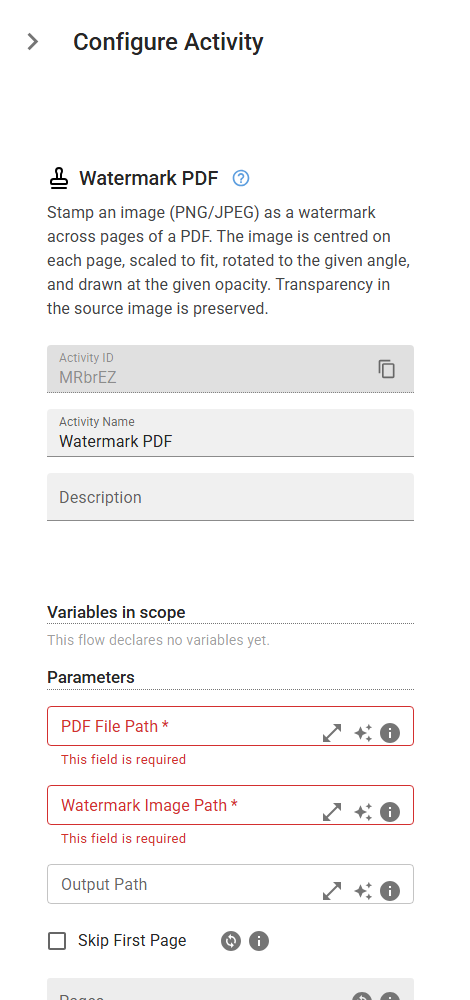
Stamp an image (PNG/JPEG) as a watermark across pages of a PDF. The image is centred on each page, scaled to fit, rotated to the given angle, and drawn at the given opacity. Transparency in the source image is preserved.
Category: Structured Data Files (Excel, JSON, PDF) · Group: Files · Activity name: WatermarkPDF
Example
outputVariable = WatermarkPDF("<filePath>", "<imagePath>", outputPath="<outputPath>", skipFirstPage=False, pages=[], rotation=45, opacity=0.15, scale=0.85)
Inputs
| Name | Type | Required | Default | Description |
|---|---|---|---|---|
| PDF File Path | string | Yes | Path to the PDF file to watermark. | |
| Watermark Image Path | string | Yes | Path to the watermark image (PNG or JPEG). PNG transparency is preserved. | |
| Output Path | string | Path for the watermarked PDF. If empty, overwrites the input file. | ||
| Skip First Page | boolean | False | Leave the first page unstamped (e.g. a cover or letterhead page). Ignored when specific Pages are listed. | |
| Pages | array | 0-indexed pages to watermark. Empty = all pages (subject to Skip First Page). Negative = from end (-1 = last page). | ||
| Rotation (degrees) | float | 45 | Counter-clockwise rotation of the watermark, in degrees. 45 gives a diagonal stamp. | |
| Opacity | float | 0.15 | Watermark opacity from 0 (invisible) to 1 (fully opaque). 0.15 is a typical faint watermark. | |
| Scale | float | 0.85 | Watermark size as a fraction of the page, sized so the rotated image fits within the page at any angle. |
Outputs
| Name | Type | Description |
|---|---|---|
| outputVariable | string | Path to the watermarked PDF file. |