Write Data to Excel .xlsx
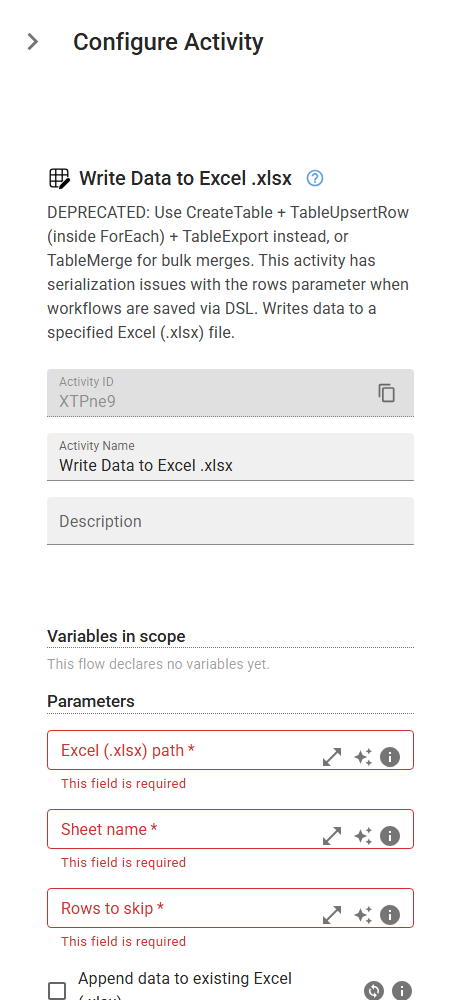
DEPRECATED: Use CreateTable + TableUpsertRow (inside ForEach) + TableExport instead, or TableMerge for bulk merges. This activity has serialization issues with the rows parameter when workflows are saved via DSL. Writes data to a specified Excel (.xlsx) file.
Category: Structured Data Files (Excel, JSON, PDF) · Group: Files · Activity name: WriteToExcel
Example
outputVariable = WriteToExcel("<fullPath>", "<sheetName>", skipRow=0, writeExisting=True, rows={})
Inputs
| Name | Type | Required | Default | Description |
|---|---|---|---|---|
| Excel (.xlsx) path | string | Yes | The full path to the Excel (.xlsx) file where the data will be written. | |
| Sheet name | string | Yes | The name of the sheet of where data will to be written. | |
| Rows to skip | integer | Yes | The index of the row of where data will be written. If set to -1, the data will be appended after the last row in the sheet. Row indexing starts from 0. | |
| Append data to existing Excel (.xlsx) | boolean | Check this box to append data to an existing Excel file. If not checked, it will overwrite the existing data. | ||
| Configure data rows | object | Define the rows to be added to the table. |
Outputs
| Name | Type | Description |
|---|---|---|
| outputVariable | string | Specifies the name of the variable that will store the path to the new .xlsx or the .xlsx. |