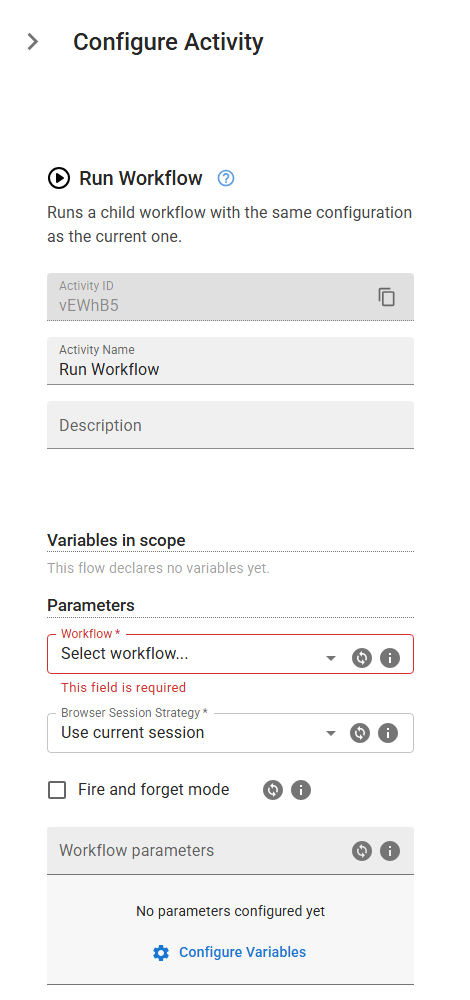
Run Workflow
Runs a child workflow with the same configuration as the current one.
Category: Flow Control & Logic · Group: Flow Control · Activity name: ExecuteChildWorkflow
Example
ExecuteChildWorkflow("<workflowId>", "useCurrentBrowserSession", fireForget=True, parameters={}, outputMappings={})
Inputs
| Name | Type | Required | Default | Description |
|---|---|---|---|---|
| Workflow | string | Yes | The workflow to be executed. | |
| Browser Session Strategy | string | Yes | useCurrentBrowserSession | Control how the browser session is handled across all Start Browser activities in the child workflow. You can choose to reuse an existing session, start a fresh one, start a new session that inherits data from the previous session or a saved local profile, or respect the session behavior defined within the child workflow. This setting overrides session behavior defined within the child workflow and determines whether browser state — such as cookies, login sessions, and local storage — is continued, reset, or restored. This option is not supported when running the workflow using the browser extension. One of: useCurrentBrowserSession, newBrowserSession, newBrowserSessionWithCurrentContext, newBrowserSessionWithLocalProfile, useChildWorkflowBrowserSessionPreferences. |
| Fire and forget mode | boolean | If enabled, the child workflow will start and execution will continue immediately without waiting for its completion. If disabled, the parent workflow will wait for the child workflow to finish before proceeding. | ||
| Workflow parameters | object | Define parameters to be used when executing the child workflow. | ||
| Output variables | object | Copy variables out of the child workflow back into this workflow. |