Webpage to PDF
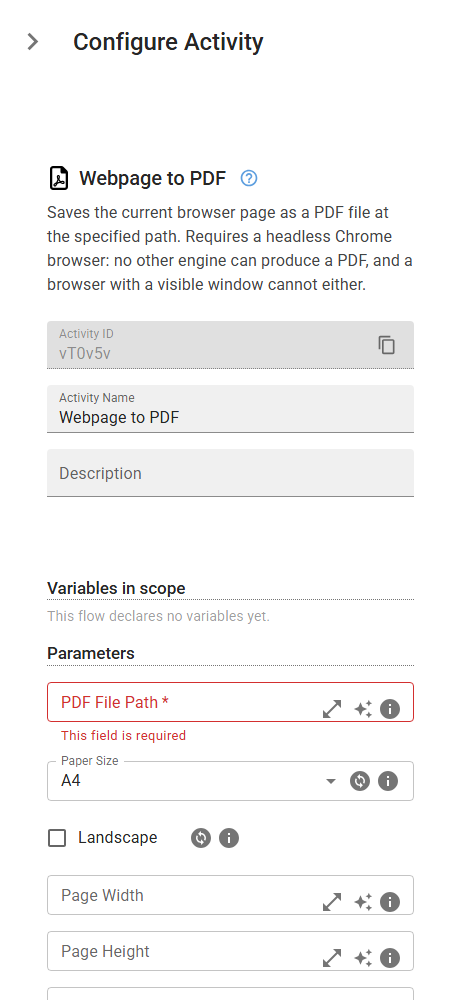
Saves the current browser page as a PDF file at the specified path. Requires a headless Chrome browser: no other engine can produce a PDF, and a browser with a visible window cannot either.
Category: Web Scraping & Data Extraction · Group: Web · Activity name: WebpageToPDF
Example
outputVariable = WebpageToPDF("<filePath>", format="A0", landscape=False, width="<width>", height="<height>", margin="<margin>", scale=0.0, printBackground=False, preferCSSPageSize=False, media="print")
Inputs
| Name | Type | Required | Default | Description |
|---|---|---|---|---|
| PDF File Path | string | Yes | Full path (including filename and .pdf extension) where the PDF should be saved. Example: /tmp/mypage.pdf | |
| Paper Size | string | A4 | Paper size to print onto. Ignored when both Page Width and Page Height are given. One of: A0, A1, A2, A3, A4, A5, A6, Letter, Legal, Tabloid, Ledger. | |
| Landscape | boolean | False | Print the page sideways. Ignored when 'Use the page's own size' is on, since the page's own @page rule then decides the orientation. | |
| Page Width | string | A custom paper width with units, e.g. 1100px or 8.5in. Takes effect only when Page Height is also given, and then replaces Paper Size. | ||
| Page Height | string | A custom paper height with units, e.g. 1400px or 11in. Takes effect only when Page Width is also given. | ||
| Margin | string | Margin applied to all four sides, with units, e.g. 12mm. Left empty the content runs to the edge of the paper. | ||
| Scale | float | Scale of the rendering, between 0.1 and 2. Use 0.8 to fit a wide page onto narrower paper. Left empty the page renders at its natural size. | ||
| Print Backgrounds | boolean | False | Include background colours and images. Off by default, because a browser printing to paper assumes you want to save ink — which turns a coloured dashboard white. | |
| Use the page's own size | boolean | False | Let a @page rule in the page's own stylesheet decide the paper size and orientation, overriding Paper Size and Landscape. The right choice for a page built to be printed, since its stylesheet already knows the shape it was designed for. | |
| Render As | string | print | Which stylesheet to render with. 'Print' is what a PDF normally wants. Choose 'Screen' only when the page's print rules hide what you are trying to capture. One of: print, screen. |
Outputs
| Name | Type | Description |
|---|---|---|
| outputVariable | string | The name of the variable that will contain the saved PDF file path. |